

The best video analytics platforms depend on what you need to improve. Mux Data, Bitmovin, Conviva, and NPAW are built around streaming performance and viewer experience. YouTube Analytics and Vimeo Analytics are practical for creators and hosted-video teams. Wistia and Vidyard connect video engagement to marketing or sales workflows.
That distinction matters. A dashboard that shows watch time may say nothing about rebuffering on a television app. A QoE tool can reveal playback failures but may not identify which prospect watched a product demo. Start with the decision you need to make, then choose the platform that captures the evidence behind it. If your audience is spread across services, our YouTube alternatives comparison can help define which distribution channels your measurement plan must cover.
Quick recommendations
Choose Mux Data when an engineering team needs detailed playback quality across players, apps, and delivery partners. Bitmovin is a strong fit when player telemetry, real-time alerting, and monetization diagnostics belong in one observability workflow. Conviva and NPAW suit larger streaming services that need cross-team operational and business intelligence.
For creator and hosted-video analytics, YouTube Analytics is the natural first stop for YouTube channels, while Vimeo works well for teams already hosting and sharing video there. Wistia is designed around marketing engagement. Vidyard is more useful when individual viewer activity should reach sales and revenue teams.
QoE
Mux Data
Developer-led playback diagnostics.
Observability
Bitmovin
Player, session, and ad troubleshooting.
Marketing
Wistia
Content engagement and lead journeys.
Sales
Vidyard
Account-level viewing signals.
What a video analytics platform should help you decide
A useful platform does more than collect events. It shortens the distance between a signal and an action. Streaming engineers may need to find the device, player version, CDN, or geography behind a spike in failures. A content team may need to see where viewers leave. A revenue team may need to connect ad errors, subscriber behavior, or named-account viewing to commercial outcomes.
The four common jobs are:
- Operational quality: startup time, failures, buffering, bitrate shifts, device performance, and session health.
- Audience and content: reach, watch time, retention, completion, traffic sources, and content comparisons.
- Revenue and monetization: ad starts, ad errors, subscription behavior, churn risk, and the relationship between experience and value.
- Sales and marketing: named viewers, account engagement, calls to action, lead activity, and CRM context.
No single tool is automatically best at all four. Buying for the wrong layer creates attractive dashboards that do not change decisions.
MEASUREMENT MAP
Four measurement layers, four different questions
Start at the layer where the unanswered question sits. Keep metric definitions separate even when dashboards share data.
01 · Playback quality
Did the session start and stay stable?
Decision owner: Engineering / video operations
02 · Audience and content
What did viewers watch, skip or finish?
Decision owner: Content / audience team
03 · Revenue
Where do viewing conditions and monetization outcomes intersect?
Decision owner: Commercial / monetization team
04 · Sales and marketing
Which permitted viewer signals change the next follow-up?
Decision owner: Sales / demand generation
If the fault starts upstream, use our video encoding software guide and streaming codec comparison to examine the output path.
The eight platforms at a glance
| Platform | Best for | Primary layer | Notable evidence | Implementation fit | Main caution |
|---|---|---|---|---|---|
| Mux Data | Developer-led streaming QoE | Operational | Session quality and engagement | Web, mobile, OTT players | Needs engineering ownership |
| Bitmovin | Player and ad diagnostics | Operational | Alerts, session and monetization views | Streaming product teams | Validate cross-stack coverage |
| Conviva | Enterprise streaming intelligence | Operational + business | Cross-device service intelligence | Large streaming services | Enterprise scope and governance |
| NPAW | OTT operations and business context | Operational + revenue | QoE, audience and business views | OTT organizations | Test joined workflows |
| YouTube Analytics | YouTube channel decisions | Audience/content | Platform-native impressions and retention | Creators and channel teams | YouTube-only context |
| Vimeo Analytics | Hosted video teams | Audience/content | Library and embed reporting | Vimeo-centered workflows | Plan-dependent depth |
| Wistia | Marketing video | Marketing | Engagement and lead journeys | Demand generation teams | Not deep streaming QoE |
| Vidyard | Sales video | Sales | Viewer and account activity | CRM-led revenue teams | Identity and consent requirements |
1. Mux Data
Best for: developer-led streaming QoE
Mux Data is built for teams that need to understand how playback behaves in real sessions. Its official product material groups streaming analytics, viewer engagement, and quality of experience, with measurements such as playback failure, startup time, rebuffering, bitrate, ad performance, and engagement. It supports web, mobile, and connected-TV environments and can export data into other systems.
The practical advantage is diagnostic depth. A media engineering team can move from “rebuffering increased” to a narrower segment such as one player release, operating system, country, or delivery path. That makes Mux useful when telemetry must feed incident response, release validation, and ongoing optimization. When an issue points back to the source feed, check the streaming encoder tools responsible for creating that signal.
It is less compelling for a small team that only needs basic content popularity. Instrumentation, event quality, and ownership by engineering all matter. If the team cannot act on the dimensions collected, a simpler native dashboard may deliver more value.
2. Bitmovin Analytics and Observability
Best for: player and monetization diagnostics
Bitmovin’s observability product focuses on playback, session visibility, monetization, alerts, and debugging. It fits teams that want analytics close to the player and delivery workflow, especially when playback quality and ad performance must be investigated together.
A strong use case is a streaming service launching a new application version. The team can watch startup failures, buffering, and session behavior, define alerts, and investigate affected playback sessions. This is more operational than a standard audience dashboard.
The trade-off is scope. Bitmovin can be especially logical for teams already using its player or video stack, but buyers should test the exact SDK coverage, data export, alerting, and cross-player support they need. The value comes from faster diagnosis, not from collecting the largest possible set of charts. Compare your existing live streaming software and player workflow before adding another monitoring layer.
3. Conviva
Best for: enterprise streaming intelligence
Conviva is positioned for large streaming businesses that need a shared view of experience, audience, and operational performance. The platform is most relevant when engineering, operations, product, content, and commercial teams need consistent session-level definitions across many devices and regions.
Its economics look different from a creator analytics product. The justification is usually reduced incident time, better release decisions, service-level visibility, and a common measurement layer across departments. That also means implementation and governance deserve attention. Ask who owns metric definitions, how data is sampled, how long it is retained, and how alerts flow into existing operations.
Conviva is likely more platform than a small publisher needs. It becomes plausible when scale, device fragmentation, and organizational coordination are already expensive problems.
4. NPAW
Best for: OTT operations and business context
NPAW combines video quality, audience, content, and business-oriented analytics for streaming services. It is a practical candidate for OTT teams that want operations and business stakeholders to work from connected views rather than separate technical and content dashboards.
The differentiator to validate is how well the platform joins experience data to outcomes that matter to the service, such as engagement, conversion, retention, or monetization. A useful proof of concept should follow several real sessions from playback conditions through business segmentation.
Teams should avoid evaluating NPAW only through executive dashboards. Include the people who will troubleshoot incidents, investigate content performance, and maintain instrumentation. A broad suite creates value only when its definitions remain trusted across those workflows.
5. YouTube Analytics
Best for: YouTube creators and channel teams
For a channel whose distribution happens mainly on YouTube, YouTube Analytics is usually the most direct source for impressions, click-through rate, watch time, audience retention, traffic sources, viewer activity, and content comparisons. It is already tied to the platform’s recommendation and audience environment.
Its strength is context, not portability. The dashboard can show how videos and Shorts perform on YouTube, but it does not provide neutral cross-platform measurement or deep player-level QoE diagnostics. A creator should use retention curves and traffic-source changes as clues, then review the video, title, thumbnail, and audience promise together.
Do not treat one metric as a verdict. A higher click-through rate with weak watch time may reflect a mismatch between the packaging and the video. A lower completion rate on a longer tutorial can still produce more useful minutes watched and stronger viewer satisfaction. If revenue is the goal, pair these engagement signals with the eligibility and policy checks in our YouTube monetization guide.
6. Vimeo Analytics
Best for: teams hosting and sharing video on Vimeo
Vimeo Analytics is a sensible option for organizations already using Vimeo to host, embed, manage, or share videos. It can reduce tool sprawl by keeping performance reporting close to the video library and publishing workflow.
This is often enough for training libraries, internal communications, event recordings, portfolios, and marketing sites that need straightforward viewing and engagement data. The decision hinges on the reporting depth available in the team’s plan, the dimensions supported for embedded playback, and whether data can reach the organization’s broader reporting stack.
Vimeo should not be chosen as an independent observability layer for a complex streaming service. It is strongest when hosting workflow and analytics convenience matter more than granular multi-player diagnosis. Teams considering a move between services can use our creator platform comparison to separate hosting requirements from reporting requirements.
7. Wistia
Best for: marketing video engagement
Wistia treats video as part of a marketing journey. Its analytics are useful when teams care about engagement, individual viewing behavior, calls to action, and the relationship between videos and lead generation.
Imagine a software company with a product overview, webinar clips, and onboarding videos. The marketing team can compare engagement, inspect where viewers leave, and decide whether to change the opening, the call to action, or the page placement. The valuable unit is not just a play. It is the viewer’s progress through a specific message.
Wistia’s focus also defines its boundary. It is not a replacement for full streaming QoE observability, and it may be unnecessary if the team only publishes occasional public videos. Evaluate consent, identity resolution, CRM integrations, and data retention before connecting viewing activity to lead records.
8. Vidyard
Best for: sales video and account-level activity
Vidyard is built around video in sales and marketing workflows. It becomes useful when a team wants to know whether a prospect or account watched a demo, proposal, explainer, or personalized video and then pass that signal into a CRM or engagement process.
The operational question is whether the signal changes follow-up. A salesperson might respond differently when a buying committee watches a security walkthrough than when one contact opens a short introduction. Define that action before buying the platform.
Vidyard is not the right center of gravity for a consumer streaming service. Its value is tied to identifiable business viewers, workflow integrations, and disciplined follow-up. Buyers should verify identity handling, consent, CRM mapping, and the limits of viewer-level data in each market.
Which analytics layer do you need?
| Your primary question | Start with | Why | Possible second layer |
|---|---|---|---|
| Why does playback fail? | Mux, Bitmovin, Conviva, or NPAW | Session and device diagnostics | Warehouse or BI |
| Which content keeps attention? | YouTube, Vimeo, or Wistia | Retention and content comparisons | Web analytics |
| Are ads or subscriptions affected? | Bitmovin, Conviva, or NPAW | Experience and monetization context | Revenue BI |
| Which prospects watched? | Vidyard or Wistia | Viewer identity and CRM workflows | CRM analytics |
| Do we need one platform? | Often no | Different layers answer different questions | Join trusted data later |
If playback failures or buffering are the problem, start with a QoE product. If the main question is why a piece of content succeeds, begin with the platform that hosts or distributes it. If video supports demand generation or sales, prioritize identity, consent, calls to action, and CRM integration.
Many mature teams need two layers. A streaming service may use a dedicated observability platform for session health and a warehouse or business-intelligence layer for subscribers and revenue. A marketing team may use Wistia or Vidyard for viewer activity while a web analytics platform measures the rest of the page journey.
Metrics that lead to action
A metric matters when the team knows what could change it and who owns the response. Startup time can point to player initialization, manifests, network conditions, or delivery configuration. Rebuffering can lead to bitrate-ladder, player, CDN, or connectivity analysis. A retention drop can prompt a content edit, but it can also reflect a weak title promise or the point at which the viewer got the answer. For problems involving resolution or compression, our video encoding software guide explains the tools on the delivery side of that investigation.
If compatibility differs across devices, review our video codec guide before assigning the issue to a dashboard or CDN. For presenter-led content, the webinar software comparison helps map the platform and recording workflow that your analytics must cover.
| Signal | Useful segment | Likely investigation | Owner |
|---|---|---|---|
| Playback failure | Player, device, app version, geography | Release, manifest, CDN, compatibility | Engineering |
| Slow startup | Network, content type, player, region | Initialization, manifest, delivery | Player or video ops |
| Retention drop | Timestamp, audience, source, format | Promise, structure, answer point | Content |
| Ad error | Ad tag, device, demand partner, region | Timeout, integration, inventory | Monetization |
| Named-account viewing | Account, asset, stage, consent | Message, follow-up, CRM mapping | Sales or marketing |
The comparison should also preserve context. Median performance can hide severe problems on a minority of devices. Global averages can hide one country or app version. A strong platform lets teams segment and trace a session without turning every chart into an alert.
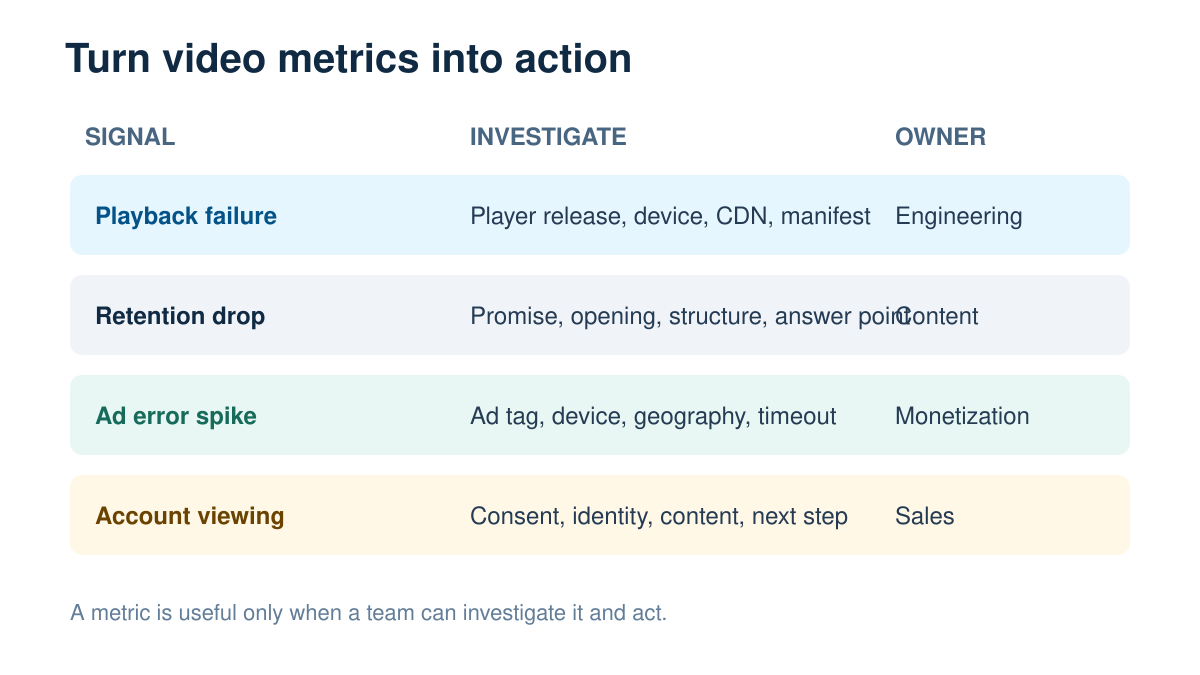
SIGNAL → INVESTIGATION → OWNER
Turn a signal into an owned investigation
Open the symptom that matches your question. These are investigation paths, not proof that a metric caused the outcome.
Playback errors increased
Segment by player, device, app release and region. Engineering checks release changes, manifest handling and delivery compatibility.
Viewers leave at the same timestamp
The content team reviews the exact moment alongside audience and traffic source. Check the promise, pacing and point where the question is answered.
Prospects watch but no follow-up occurs
Sales or marketing checks the permitted identity match, asset context and CRM mapping. Define who acts on the signal before adding alerts.
For channel publishing, compare your workflow with our YouTube creator tools guide; evaluate revenue against YouTube monetization requirements.
How to choose a video analytics platform
Start with decisions, not features
Write down three decisions the platform must improve. Examples include whether to roll back a player release, which videos deserve promotion, where an ad workflow fails, or which accounts need sales follow-up. If a requested feature does not support one of those decisions, it is probably not essential.
Map the data path
Document where playback or viewer events originate, which identifiers are used, where consent is captured, and where the data must go. Include web players, mobile apps, connected TVs, CDNs, ad systems, CRM tools, warehouses, and alerting platforms as applicable.
Estimate the full operating cost
License price is only one part of cost. Add SDK implementation, quality assurance across devices, taxonomy design, dashboard maintenance, alert tuning, data export, warehouse processing, training, and incident ownership. A cheaper product can become expensive if the team spends weeks reconciling definitions.
Run a representative proof of concept
Use real player versions, content types, devices, regions, and failure cases. Seed a known playback problem if appropriate in a controlled environment. Confirm that the platform detects it, narrows the cause, and helps the right person act. For marketing or sales tools, test identity, consent, CRM mapping, and follow-up rather than stopping at a heatmap demo. For camera-based live workflows, include the capture card and input path in the test so an upstream fault is not mistaken for a player problem.
Score evidence, not presentation polish
A useful pilot scorecard includes data completeness, time to diagnosis, metric clarity, integration effort, privacy controls, export access, alert quality, and the number of decisions the platform improved. Executive dashboards are helpful, but they should not outweigh trustworthy underlying events.
YOUR PILOT — NOT TSR TEST RESULTS
Pilot acceptance gates before wider rollout
- Gate 1 · Known sessions appear
Confirm expected events against a small set of sessions you can independently inspect.
- Gate 2 · Segmentation works
Check representative devices, players, regions and versions; avoid relying only on an aggregate.
- Gate 3 · A failure reaches an owner
Use a controlled failure where appropriate and validate the alert, investigation and escalation path.
- Gate 4 · Definitions and exports reconcile
Document sampling, exclusions and time zones. Confirm that permitted exports match the dashboard definitions.
- Gate 5 · A decision improves
Record a concrete release, content or campaign decision supported by the evidence before expanding coverage.
Built-in analytics or a specialist platform?
Built-in analytics are often enough when one distribution platform contains most of the audience and the team’s questions are content-focused. YouTube creators should exhaust YouTube Analytics before paying for a broad third-party dashboard. Teams hosting on Vimeo may find its native reporting sufficient.
A specialist platform becomes more valuable when the service spans many players and devices, failures have material cost, the team needs real-time alerts, or viewer data must connect to operational and commercial systems. It can also be justified when different departments repeatedly argue about definitions because their dashboards measure sessions differently.
The threshold is organizational as much as technical. A tool cannot repair missing ownership. Name the people responsible for instrumentation, metric definitions, alerts, content decisions, privacy, and vendor management before expanding the stack.
Privacy, governance, and data ownership
Video telemetry can include device details, network information, approximate location, identifiers, viewing history, and account or lead context. That makes privacy and governance part of product selection, not an afterthought.
Ask vendors which data is collected by default, which fields can be disabled, where data is processed, how long it is retained, whether identifiers can be pseudonymized, and how deletion requests are handled. Confirm role-based access, audit logs, data export, subprocessors, and contractual terms. Marketing and sales teams should be especially careful when joining named viewer activity to CRM records.
Define a metric dictionary. Terms such as play, start, view, active viewer, completion, failure, and watch time can vary across tools. Record the event logic, exclusions, sampling, time zone, and owner. Without that discipline, cross-platform comparisons create false precision.
Implementation workflow
- Name the business and operational decisions.
- Define the event and identity model.
- Instrument a representative subset of players or videos.
- Validate event completeness against known sessions.
- Build a small set of role-specific views.
- Set alerts only where an owner and response exist.
- Run the proof of concept through a normal release or campaign.
- Document definitions, access, retention, and escalation.
- Review whether decisions became faster or better.
- Expand coverage only after the first workflow is trusted.
For streaming teams, delivery settings remain part of the evidence. Check how upload capacity, resolution, frame rate, and platform limits shape a viable stream. The live streaming encoder tools guide covers the software and hardware that create the outgoing signal. Analytics can reveal symptoms, but those upstream choices often explain them.
Common buying mistakes
The first mistake is buying a broad dashboard before defining a decision. The second is treating audience analytics and playback observability as interchangeable. The third is evaluating only the demo data, which is usually cleaner than production telemetry.
Teams also underestimate implementation ownership. SDKs change, apps evolve, identifiers drift, and new privacy requirements appear. An analytics platform needs maintenance. Finally, avoid metric theater: more charts do not create more insight when no one has authority to act.
Frequently asked questions
What is the difference between video analytics and video observability?
Video analytics is the broad category. It includes audience, content, marketing, revenue, and playback measurements. Video observability focuses more narrowly on the health of playback sessions and the ability to detect, diagnose, and resolve technical problems.
What is QoE in video streaming?
Quality of experience, or QoE, describes what the viewer actually encounters, including whether playback starts, how long it takes, how often it buffers, the quality delivered, and whether errors interrupt the session. It differs from infrastructure health because servers can appear healthy while a subset of viewers has a poor experience.
Can Google Analytics replace a video analytics platform?
Google Analytics can measure page and event behavior if video events are implemented, but it is not a complete replacement for detailed player QoE, session diagnostics, or platform-native audience data. It can complement a specialist tool by connecting video interactions to the wider website journey.
Which platform is best for YouTube creators?
YouTube Analytics is usually the best starting point because it has direct access to YouTube impressions, traffic sources, watch behavior, audience data, and content comparisons. Third-party tools may help with workflow or competitive research, but they cannot recreate every platform-native signal.
How long should a proof of concept run?
Run it long enough to include a representative release, campaign, content cycle, device mix, and at least one real or controlled incident. For many teams that means several weeks, but coverage matters more than an arbitrary duration.
Related TSR Guides
STREAMING WORKFLOW
Live streaming software
Connect your production workflow to the viewer experience.
Read guide →ENCODING
Streaming encoder tools
Review the encoding stage behind playback quality.
Read guide →DISTRIBUTION
YouTube alternatives
Compare distribution choices and audience fit.
Read guide →


Leave a Reply