The best AI script generator for YouTube depends on where your real bottleneck sits. vidIQ is the strongest fit when you want a YouTube-specific path from idea to hook, full script and packaging. ChatGPT is the most flexible co-writer for creators who bring their own research and channel rules. Claude is especially useful for long source packs and voice-focused revision. Descript makes more sense when scripting needs to flow directly into recording and editing.
That answer is more useful than a single universal winner. A tool that creates a fast 60-second Short can be a poor choice for a sourced 15-minute documentary. A general assistant can produce a better script than a template tool when you supply strong material, but it can also produce a polished pile of guesses when you do not. Creators distributing beyond one channel can use our YouTube alternatives guide to choose the formats and audiences the brief should address.
This guide compares nine options by workflow, control, research support and production handoff. It also gives you a repeatable process for turning any generated draft into something accurate, natural and ready to record.
Quick picks by creator workflow
Choose vidIQ if YouTube-specific hooks, pacing and channel packaging matter most. Choose ChatGPT if you want one flexible workspace for research, outlines, drafts and rewrites. Choose Claude if you routinely work from long transcripts, interviews or style references. Choose Descript if the same workspace will handle the script, recording and edit. Choose VEED or InVideo AI when speed from prompt to assembled video matters more than sentence-level control.
ILLUSTRATIVE WORKSHEET
A useful brief before a single line of script
Illustrative brief for a camera-setup tutorial. Replace these fields with your own project before generating prose.
- Viewer
- A first-time creator connecting a camera to a computer.
- Promise
- Show the complete input-to-recording path and explain the common failure points.
- Evidence
- Use your own device notes, recordings and current manufacturer documentation.
- Format
- A spoken tutorial with separate screen demonstrations and narration.
- Acceptance check
- A viewer can reproduce the process; every device or compatibility claim has evidence.
Choose the supporting tools separately using our AI tools for YouTube creators guide.
A useful boundary is simple: the generator should reduce blank-page work, not replace editorial judgment. Your channel knowledge, sources, examples and delivery style remain the inputs that make the script worth watching.
WORKFLOW
YouTube-specific
vidIQ for ideas, hooks, scripts and packaging in one creator workflow.
WORKFLOW
Flexible co-writing
ChatGPT for research, outlines, drafts and reusable channel instructions.
WORKFLOW
Long source packs
Claude for synthesis, structure and voice-focused revision.
WORKFLOW
Script to edit
Descript when writing, recording and text-based editing should stay close.
What an AI script generator actually does
An AI script generator turns a brief into some combination of a hook, outline, narration, scene notes, transitions and call to action. YouTube-specific systems may add title ideas, keyword context or retention patterns. General assistants offer more freedom to interrogate sources and reshape structure. Production suites connect the script to recording, stock media, captions, voiceover or editing.
Those are three different products hidden behind one search term. Compare them by the job you want completed:
Research and reasoning: Can the tool work from your sources, distinguish evidence from inference and help expose missing facts?
Channel voice: Can you preserve vocabulary, point of view, sentence rhythm and recurring formats without copying another creator?
Spoken structure: Does the draft sound natural aloud, not merely clean on a page?
Retention design: Can you control the promise, stakes, open loops, examples and pace?
Production handoff: Can the script move cleanly into a teleprompter, recording session or edit?
Governance: Can a team see sources, revisions and approvals before publication?
No tool guarantees accuracy, originality, retention or views. Treat claims about performance as product positioning unless independently supported by your own channel data.
AI script generator comparison
| Tool | Best for | Workflow control | Research / context | Production handoff | Main trade-off |
|---|---|---|---|---|---|
| vidIQ | YouTube-specific scripting | Guided | YouTube and channel context | Titles, descriptions and packaging | Can encourage familiar patterns |
| ChatGPT | Flexible co-writing | High | Projects, files and web research | Export or copy to production tools | Needs a disciplined brief |
| Claude | Long source packs | High | Projects, large knowledge bases and styles | External handoff | Verification still required |
| Gemini | Google-centered research | High | Research and Google ecosystem | External handoff | Source review is essential |
| Descript | Script to recording | Medium | Prompt and templates | Recording, transcript and text edit | Less suited to deep research |
| Jasper | Brand-governed teams | Medium to high | Brand and campaign context | Marketing workflow | May be excessive for solo creators |
| Copy.ai | Workflow automation | Medium | Workflow inputs and team context | Multi-asset repurposing | Can scale weak material |
| VEED | Fast browser production | Medium | Prompt-led | Video, captions and editing | Less granular argument control |
| InVideo AI | Prompt-to-video automation | Lower | Prompt and revisions | Assembled video output | Less line-by-line control |
| Tool | Best workflow | Main trade-off |
|---|---|---|
| vidIQ | YouTube-native planning | Pattern sameness |
| ChatGPT | Flexible co-writing | Needs a strong brief |
| Claude | Long source synthesis | Still needs verification |
| Descript | Script to recording | Less research depth |
How we evaluated the tools
This is an editorial workflow comparison, not a laboratory benchmark. Recommendations are based on current official product documentation reviewed on September 27, 2026, the shape of current search results and the practical requirements of YouTube scripting. We did not invent test scores or claim private hands-on results.
Each tool was assessed on five questions. Does it support a useful brief? Can it maintain enough context for a complete narrative? How much control does the creator have over structure and voice? Does it help with YouTube-specific packaging or the production handoff? What new risk or workload does it introduce?
Features, model access and plan limits change frequently. Confirm current limits before paying for a subscription, especially if a feature such as projects, brand controls, collaboration or AI credits is central to your workflow.
1. vidIQ
Best for: YouTube-specific script workflow
vidIQ is the clearest choice when you want a script tool shaped around YouTube rather than general business writing. Its current Script Writer documentation describes a flow that starts with an idea, asks for angle and tone, offers multiple concepts, then generates a full script that can be refined or downloaded. The wider vidIQ suite connects scripts with titles, descriptions, keywords and thumbnail ideas.
That integrated context is the advantage. A creator planning several videos per week can move from idea selection to packaging without rebuilding the brief in separate apps. It is particularly suited to tutorials, commentary, reviews and repeatable channel formats where a dependable structure saves time. Keep commercial goals grounded in the requirements covered by our YouTube monetization guide rather than assuming better packaging guarantees revenue.
The trade-off is creative sameness. YouTube patterns are useful, but a script can feel assembled from familiar hooks and pacing devices when the input lacks a distinct thesis. Do not ask vidIQ to “make it viral.” Give it your audience tension, evidence, contrarian point and payoff. Then rewrite the opening until it sounds like a promise only your channel would make.
For Shorts, note that the official Script Writer documentation describes a primarily long-form workflow. Adapt the draft and time it aloud rather than assuming a dedicated Shorts format.
Best for: solo creators and small teams that want YouTube-specific ideation, scripting and packaging in one place.
2. ChatGPT
Best for: flexible AI co-writer
ChatGPT works best as a configurable writing workspace rather than a one-click script button. Projects can keep channel instructions, source files and related chats together, which is useful for recurring formats. You can define a standing brief that includes audience, prohibited phrases, evidence rules, average sentence length, on-screen notes and the shape of a strong opening.
Its strength is iteration. You can ask for three competing structures, pressure-test the logic, isolate unsupported claims, rewrite a section for spoken rhythm, or turn a long draft into a Short without losing the central idea. The quality gap between a vague prompt and a source-rich project is large, so the setup matters.
Use ChatGPT when the creator wants to remain the editor. Start with an evidence pack, request an outline before prose, approve the argument, and generate the script in sections. That prevents a fluent draft from hiding a weak structure.
Best for: creators who need research, outlining, scripting and revision in one adaptable workspace.
3. Claude
Best for: long source packs and voice revision
Claude is a strong fit for research-heavy videos built from interviews, reports, transcripts or previous episodes. Projects let creators add a focused knowledge base, while custom styles can be shaped from writing examples. That combination is useful when the main challenge is not generating words, but synthesizing a large body of material without losing the channel’s tone.
A practical workflow is to ask Claude for a source map first. It should list the claim, supporting material, uncertainty and likely narrative role. Only then should it build an outline and draft. This keeps the evidence visible before polished narration takes over.
Claude should not be treated as automatically more accurate because it can hold more context. Long inputs can still contain contradictions, outdated facts and irrelevant detail. Give the model a hierarchy of sources and require explicit flags where evidence conflicts.
Best for: video essays, interviews, explainers and documentary-style scripts with substantial reference material.
4. Gemini
Best for: Google-centered research workflows
Gemini is useful for creators already organizing ideas and notes in Google’s ecosystem. Its current product positioning emphasizes research and writing support, and it can help creators move from source discovery to a first draft and targeted revisions.
The right use case is not “write my YouTube video.” It is a staged research workflow. Ask for the question set, gather sources, separate established facts from disputed claims, then draft the narrative. For timely subjects, save publication dates and primary-source links in the brief so that a later revision does not flatten fresh and old material together.
Gemini can be efficient for teams living in Docs, but convenience should not be confused with proof. Open every important source, confirm that it says what the script claims, and record the date reviewed.
Best for: creators who want research assistance and drafting inside a Google-centered workflow.
5. Descript
Best for: script-to-edit workflow
Descript’s advantage appears after the first draft. Its official script generator produces a ready-to-edit script, and the same environment supports recording, transcription and text-based video editing. That can remove a messy handoff between writing, performance and post-production.
This is valuable for talking-head videos, tutorials and podcasts with a video version. A creator can tighten a line, record it, remove filler and reshape the edit from the transcript. The script becomes an active production document rather than a static file copied between tools. If the research starts with recorded interviews, our audio extraction guide can help prepare a separate track for transcription and review.
Descript is less compelling when a channel already has a mature production stack and only needs deep research or argument development. In that case, its integrated workflow may duplicate tools the team already pays for.
Best for: creators who want writing, recording and text-based editing close together.
6. Jasper
Best for: brand-governed content teams
Jasper fits teams that treat a YouTube channel as part of a larger brand system. The relevant question is not whether it can produce a paragraph. It is whether campaign language, audience rules, product facts and approvals need to stay consistent across scripts, landing pages, emails and social posts.
Confirm the current workflow and available features in Jasper’s marketing platform before committing to this production setup.
For that workflow, a reusable campaign brief can save coordination time. The YouTube script should still have its own spoken structure, examples and pacing. Reusing the same marketing copy across formats will make the video sound like an advertisement.
The economic case weakens for a solo creator who only needs occasional scripts. A general assistant or YouTube-specific tool may provide enough control with less workflow overhead.
Best for: marketing teams producing YouTube alongside coordinated multi-channel campaigns.
7. Copy.ai
Best for: workflow automation and repurposing
Copy.ai is most relevant when the script sits inside a repeatable content operation. A team might move from research notes to an outline, script, description, newsletter summary and social cutdowns using a governed workflow. That can reduce manual handoffs and make ownership clearer.
Confirm the current workflow and available features in Copy.ai before committing to this production setup.
The risk is scaling weak material. Automation can distribute an unsupported claim or bland message faster than a human team notices. Add approval gates after research, after the outline and before publishing derivative assets.
A small channel should not buy workflow complexity before it has a stable format. First prove the process manually. Automate only the steps that repeat without requiring fresh editorial judgment.
Best for: teams that need repeatable content operations around each video.
8. VEED
Best for: lightweight script-to-video option
VEED offers a free AI script generator and a broader browser-based video workflow. It suits creators who want to turn a simple idea into a workable script and move quickly toward assembled visuals, captions and editing.
That speed is useful for short explainers, social videos and internal content. It is less useful for a source-heavy essay where the script must carry careful reasoning. In that case, complete the research and argument elsewhere, then move the approved script into VEED for production.
Keep the script independent enough to export. Production convenience should not trap your channel voice or archive inside one vendor. For delivery outside YouTube, check the format requirements of the alternative video platforms you intend to use.
Best for: fast browser-based production and short-form teams.
9. InVideo AI
Best for: prompt-to-video automation
InVideo AI is aimed at creators who want a prompt to generate both a script and an assembled video. It can reduce the time between idea and preview, especially for faceless formats that rely on stock visuals, captions and voiceover.
Confirm the current workflow and available features in InVideo’s current product offering before committing to this production setup.
The trade-off is granular control. When the tool chooses narration, visual beats and pacing together, changing one idea can require revising several connected outputs. Preview the story structure before investing time in visual polish. Replace generic stock choices and verify every factual sentence before export.
This category also needs a stronger originality check. A technically complete video can still feel interchangeable. Add a distinctive thesis, sourced examples, original screen recordings, personal analysis or reporting. When the workflow includes multilingual narration, compare AI video dubbing tools and review voice permissions before generating localized versions.
Best for: fast faceless prototypes and creators who value assembled output over line-by-line control.
Which AI script generator should you choose?
| Creator scenario | Best starting point | Why | Watch for |
|---|---|---|---|
| Weekly solo channel | ChatGPT or vidIQ | Flexible setup or YouTube-native speed | Time lost fixing vague prompts |
| Research-heavy essay | Claude or ChatGPT | Long source packs and iterative structure | Unsupported synthesis |
| Talking-head tutorial | Descript | Script, recording and text edit stay close | Production lock-in |
| Brand content team | Jasper or Copy.ai | Reusable governance and workflows | Marketing copy that sounds stiff |
| Fast faceless prototype | InVideo AI or VEED | Prompt-to-video speed | Generic visuals and voice |
The cheapest option is not always the lowest-cost workflow. A free generator that produces a weak draft can consume more editing time than a paid tool with reusable channel context. A production suite can reduce tool switching but become expensive if you only use its script box.
For one weekly video, start with the tool you already use and measure editing time. For a high-volume channel, calculate the full path from brief to approved script. For a team, include time spent locating sources, reviewing claims and managing revisions. Subscription price is only one part of the cost.
A five-stage workflow for better AI YouTube scripts
A useful process separates thinking from prose. Do not ask for a finished script until the brief, evidence and structure are approved.
1. Build the brief
Define the viewer, their current belief, the promise, the evidence threshold and the desired action. Add the video format, target runtime and delivery style. For a tutorial, name the starting state and final result. For a review, define the decision criteria. For a video essay, write the thesis in one sentence.
Include examples of your own previous scripts when voice matters. Do not instruct a tool to imitate a living creator. Describe observable traits such as short sentences, calm delivery, specific examples and minimal hype.
2. Create an evidence pack
Collect primary sources, dates, product documentation, transcripts and firsthand material. Give every claim a source or label it as opinion. Ask the model to identify missing evidence before it writes.
For products and policies, record when the source was reviewed. Features, prices and platform rules can change between scripting and publication. For phone demonstrations, our iPhone screen recording guide can help you capture original evidence to support the narration.
3. Approve the outline
Request two or three structures, not three versions of the same list. One might be problem-to-solution, another chronological and another built around a surprising contrast. Choose the structure that makes the viewer’s question easier to follow.
Write the hook last or revise it after the outline. A strong hook promises the actual payoff. It should not manufacture stakes the video never delivers.
4. Draft in sections and run three edits
Generate one major section at a time. First run a truth edit: verify names, dates, quotes, calculations and product claims. Then run a voice edit: replace generic transitions, add specific examples and restore your point of view. Finally run a retention edit: remove repeated setup, move proof closer to claims and create clear reasons to continue.
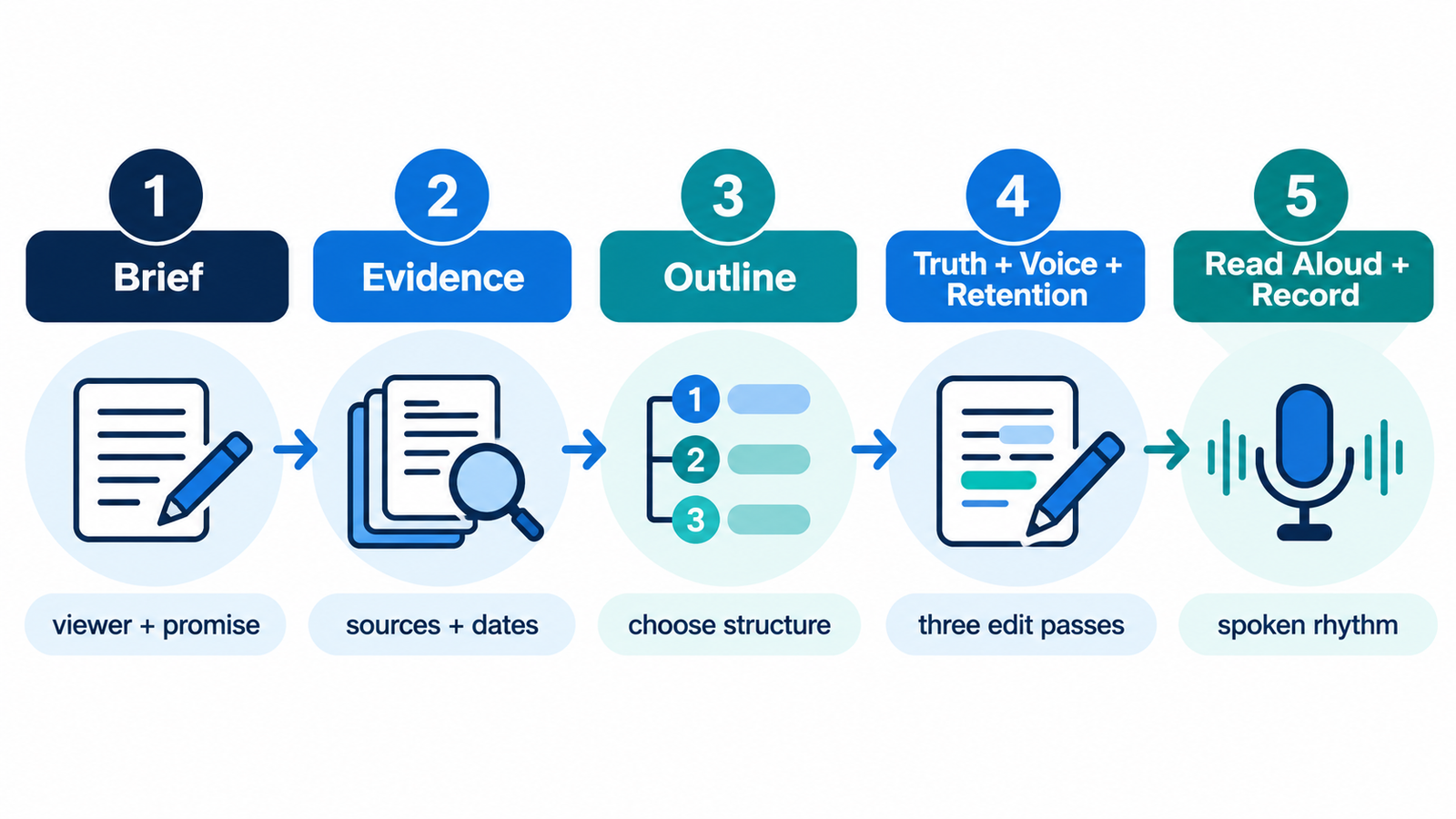
5. Read aloud and prepare production notes
A script is written for the ear. Read it at recording pace. Break long sentences, explain unfamiliar terms and mark visuals only where they improve comprehension. Estimate runtime from your actual speaking pace, not a universal words-per-minute assumption. A suitable microphone for streaming helps preserve the delivery you approved during rehearsal.
Keep scene directions separate from narration. That makes teleprompter copy cleaner and helps editors distinguish spoken words from production notes. For camera-to-computer workflows, our capture card comparison covers the input hardware; use the video encoding guide for the export stage.
PRODUCTION HANDOFF
Narration and visual notes: two separate tracks
Illustrative production handoff: the performer reads only the narration; the editor follows the visual notes.
SPOKEN NARRATION
First, confirm the camera appears in your recording software. If it does not, check the input path before changing encoding settings.
VISUAL AND EDIT NOTES
- Show the device list.
- Cut to the cable and capture input.
- Use an original screen recording to demonstrate the check.
For demonstrations, follow our iPhone screen recording instructions where applicable; use capture-card input guidance for camera sources.
READER WORKFLOW
From evidence pack to recording draft
- 1 · Brief approved
Specify the viewer, promise, format, runtime and voice rules.
- 2 · Evidence checked
Map factual claims to sources and flag gaps before narration.
- 3 · Outline chosen
Approve the argument and payoff; revise the hook to match.
- 4 · Three edits complete
Check truth, channel voice and narrative progression separately.
- 5 · Recording draft ready
Read aloud, time the delivery and separate visual notes from spoken copy.
How to protect accuracy, originality and channel voice
AI-assisted scripts fail in predictable ways. They overstate uncertain facts, use symmetrical list structures, repeat conclusions and fill transitions with empty enthusiasm. The solution is not a better adjective in the prompt. It is an editorial control system.
Maintain a channel style sheet with preferred terms, banned clichés, evidence rules, pronunciation notes and examples of strong openings. Require the draft to mark claims that depend on a source. Compare the final script with recent uploads to catch repeated metaphors or openings. If every product section has the same length and sequence, restructure the article before recording.
Originality comes from the idea and evidence, not from paraphrasing generated text. Add reporting, demonstrations, calculations, interviews, examples from your own workflow or a useful synthesis that competitors missed.
Script quality scorecard
| Dimension | Green | Amber | Red |
|---|---|---|---|
| Viewer promise | Specific and fully delivered | Broad but recoverable | Misleading or missing payoff |
| Evidence | Claims linked and current | Minor gaps clearly flagged | Unsupported factual claims |
| Originality | Distinct thesis and examples | Useful but familiar | Derivative or imitative |
| Spoken rhythm | Natural aloud | Some dense passages | Written-only cadence |
| Retention structure | Clear stakes and progression | Uneven middle | Repetition without movement |
| Production readiness | Narration and visual notes separated | Minor cleanup needed | Cannot record as written |
A script should not pass because it “sounds good.” Give each dimension a simple red, amber or green judgment. Any red item in evidence, originality or viewer promise should block recording. Rhythm and production notes can be improved during rehearsal, but unsupported claims should be fixed at the source.
Recording gate
- Every factual claim has a source or is clearly framed as opinion.
- The opening promise matches the delivered payoff.
- The script contains channel-specific examples and analysis.
- Sentences sound natural at recording pace.
- Production notes are separate from spoken narration.
YouTube disclosure, monetization and copyright considerations
YouTube’s official guidance says creators do not need to disclose generative AI used only for productivity tasks such as generating scripts, ideas or automatic captions. Disclosure becomes relevant when a video contains realistic altered or synthetic media that viewers could mistake for a real person, place, scene or event.
That distinction matters for script tools. Writing assistance alone is not the same as publishing a realistic synthetic depiction. If the workflow also generates cloned voices, realistic avatars or fabricated footage, review YouTube’s current altered-content rules before upload.
AI assistance also does not remove your responsibility for originality, rights and accuracy. Avoid copying another creator’s phrasing or structure. Confirm licenses for visuals, music and voices. Review monetization rules for repetitive or mass-produced content if automation is central to the channel. For a broader policy overview, see TSR’s YouTube monetization requirements guide.
Check the current YouTube channel monetization policies against the finished video, including its originality and repetitive-content characteristics.
Frequently asked questions
What is the best free AI script generator for YouTube?
Start with a free tier of a flexible assistant or vidIQ’s script generator, then compare the editing time required. Free access and limits change, so the best choice is the one that preserves your evidence, voice and workflow without forcing repeated setup.
Can AI write a full YouTube video script?
Yes, most tools can create a full draft with a hook, body, transitions and call to action. A complete draft is not necessarily accurate, original or ready to record. Treat it as an editable production asset.
Which tool is best for YouTube Shorts?
For Shorts, use a brief with one idea and one payoff, then time the script at your own speaking pace. vidIQ’s current Script Writer is designed mainly for long-form videos; its documentation recommends manually shortening or adapting a longer draft for a Short. General assistants can help create a concise version of a sourced script, but you must review the result.
Can AI script generators copy my channel voice?
Some tools can use project instructions, style samples or brand controls. Give them your own examples and describe your style. Do not ask for imitation of another creator, and always run a human voice edit.
Will YouTube demonetize AI-written videos?
Using AI to help write a script is not an automatic monetization violation. The bigger risks are repetitive, low-value or misleading output and other policy problems. Review the latest YouTube monetization guidance for the full video workflow, not only the script.
Do I need to disclose an AI-written script?
YouTube says productivity uses such as generating scripts or ideas do not require altered-content disclosure by themselves. Realistic synthetic or altered media can require disclosure, so assess the finished video.
How do I make an AI script sound natural?
Use a specific brief, provide your own examples, generate sections instead of one giant draft, remove generic transitions and read every line aloud. Replace summaries with concrete evidence, demonstrations or stories.
Final recommendation
Choose the tool around your bottleneck. vidIQ is the most direct YouTube-specific choice. ChatGPT is the most adaptable co-writer. Claude is a strong option for long source packs and voice revision. Descript is the practical production bridge. VEED and InVideo AI prioritize speed to assembled video.
Whichever tool you choose, the winning workflow is the same: brief first, evidence before prose, outline before draft, verification before polish and a read-aloud pass before recording. The generator can accelerate the middle of that process. It cannot decide what your channel should say.
Related TSR Guides
MONETIZATION
YouTube monetization
Check channel eligibility and revenue requirements.
Read guide →EXPORT WORKFLOW
Video encoding software
Compare tools for the delivery stage after editing.
Read guide →DISTRIBUTION
YouTube alternatives
Plan formats and audiences beyond one platform.
Read guide →


Leave a Reply